

How we added account-aware AI support to Aderic
The support assistant inside Aderic can answer questions about a signed-in customer’s own account, not only about the product. This is how we connected it with OneTwoAgent, what it is allowed to read and where a person takes over. Aderic and OneTwoAgent are built by the same team, so this is our own integration, not an independent customer review.
5:44 walkthrough2 sections · 4 viewsRead-only
The question: “What’s my recent lead?”
Aderic finds construction projects that fit a supplier’s offering and service area, contacts the relevant buyers and surfaces qualified leads. Once leads start arriving, many support questions stop being about how the product works and start being about the customer’s own account.
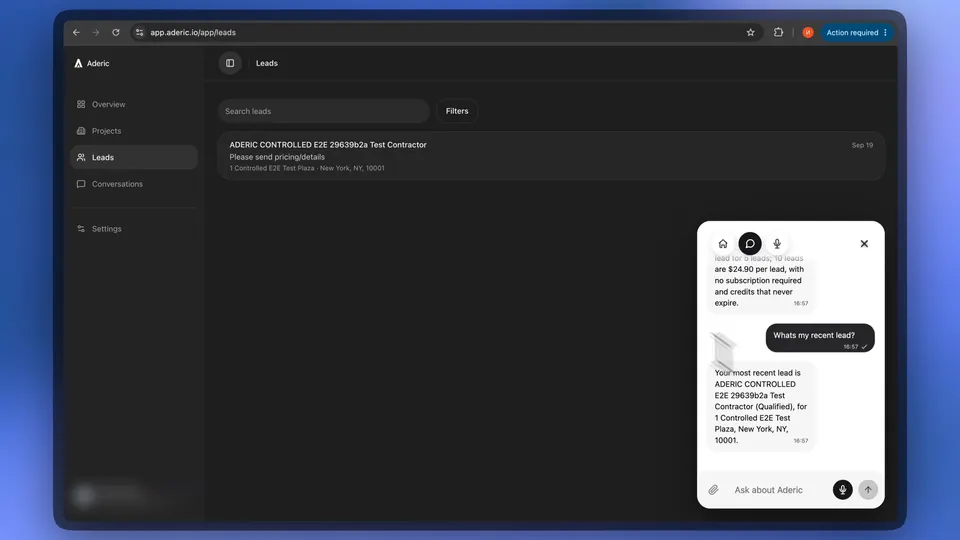
Shown in the videoIn the public walkthrough, a signed-in user on the Aderic Leads page opens the support widget and asks “What’s my recent lead?”. The answer names the same lead that sits at the top of that account’s Leads list.
Why documentation alone cannot answer it
How it worksProduct pages and help articles describe Aderic the same way for every reader. They cannot say which lead arrived yesterday, whether a campaign is paused, or whether a sending mailbox needs to be reconnected. An assistant that only knows the website would have to guess, or send the customer to look it up themselves.
Shown in the videoThe same recording shows that boundary from the other side. Asked about prices, the assistant listed the public options, said it could not tell which offer applies to that account, and pointed to billing in Aderic instead of guessing.
How the assistant knows who is asking
In Aderic’s codeThe widget loads on every Aderic page. On the public site, visitors are anonymous. Only the signed-in app at app.aderic.io identifies the customer, and it does so with the login Aderic already has:
- The existing session decides. When the widget asks who is there, the browser calls an Aderic server endpoint that reads the regular Aderic session. No session means no identity.
- Secrets stay on the server. The server sends the user’s ID, email and name to OneTwoAgent and gets back a short-lived identity token. The browser only ever receives that token.
- Account data needs a finished workspace. Only when onboarding is complete does the token carry a small signed snapshot, valid for four minutes: lead-credit usage and mailbox connection state, plus a grant for fresh lookups tied to that session.
- Signing out resets the widget. Every sign-out in Aderic passes through one function that clears the widget’s identity first.
What support may read, and what it may not
In Aderic’s codeFor anything fresher than the snapshot, OneTwoAgent calls one read-only endpoint in Aderic, authenticated with a separate server credential. The approved configuration offers two sections and four views, each a projection of what the customer already sees in the app:
- UsageLead credits used and remaining.
- IntegrationsWhether the sending mailbox is connected or needs to be re-authorised.
- CampaignRunning, paused or finished, with projects found, contacted, replies and qualified leads.
- LeadsQualified leads, newest first, with company, contact name and role, project and location.
- ConversationsBuyer conversations, those needing review first, with outcome and last activity.
- ProjectsProjects found, newest first, with outreach status.
Every lookup re-checks that the session is still live and that the customer owns the workspace, so after sign-out the next lookup fails. The views carry no email addresses, phone numbers or message bodies. Nothing in this path writes: support cannot start or pause a campaign, send a message or spend credits.
How it worksAccording to OneTwoAgent’s documentation, the AI only chooses which approved section or view to read; the user, workspace and endpoint come from trusted server context. A custom support view such as Leads or Projects returns at most six short records, and there is at most one lookup per customer message. OneTwoAgent never gets database access.
When a person needs to take over
Shown in the videoThe customer asks to talk to a human. The conversation appears in the OneTwoAgent shared inbox, a teammate takes it, and the widget shows that the conversation was passed to the team and that the teammate joined. Their reply arrives as a team member, not as the AI.
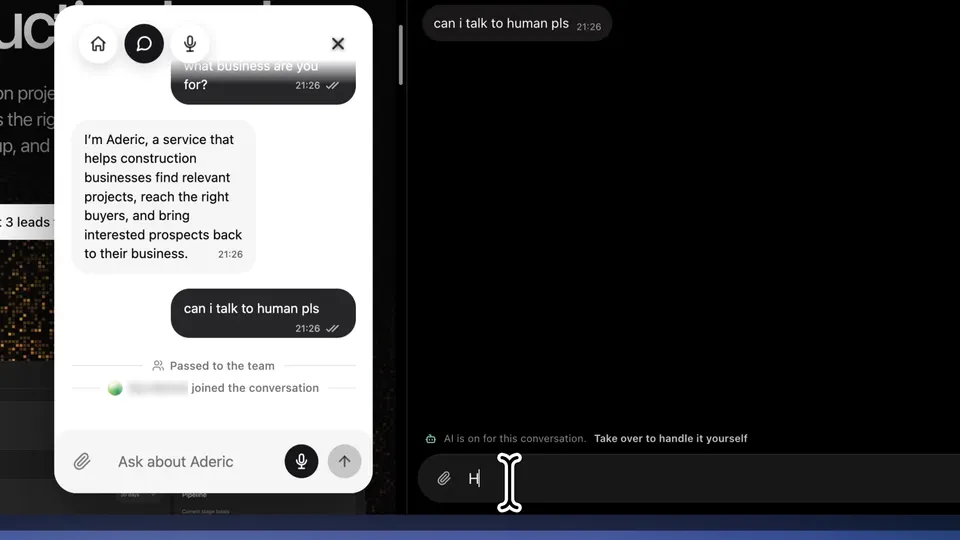
How it worksThe assistant also hands off on its own when it lacks the evidence or authority to answer. The conversation is marked as waiting on the team, and the AI stays silent while a person holds it.
In Aderic’s codeAderic has no handoff logic of its own. The inbox, takeover and handoff are part of OneTwoAgent; Aderic only supplies identity and read-only account data.
Watch the demo and read the docs
- OneTwoAgent’s Aderic walkthrough: the 5:44 video with chapters, including the account question and the handoff.
- The video on YouTube, from the account question at 3:05 and the handoff at 4:55.
- Signed-in customers and account data: identity exchange, snapshots, the read-only lookup and its limits.
- Conversations, team takeover and handoff: the shared inbox and when the AI hands off.
- @onetwoagent/integration: the npm package Aderic’s identity and account endpoints are built on. Aderic’s own source code is not public.